Published 2026-11-23 · Updated 2026-11-23 · LiveFaceSwap.co
Why a photo face swap doesn't look like the person, and the photo choices that fix it
A realistic face swap can still look like a stranger. Two real runs show why identity drifts, what an instruction change fixed, and how to pick photos that keep the person recognisable.
The first face swap we ran on our new photo tool looked perfectly natural and still didn't look like the person we put in. The target photo was a smiling woman with her hair in a bun and a small nose ring. The face photo was a different woman with a narrower face, defined brows and no piercing. The result had the face photo's brown eyes and some of her brow shape, but it kept the target's nose ring, her wide smile and much of her face shape. Anyone who knew the woman in the face photo would have said it was "sort of like her".
That is the most common complaint about AI face swaps: the result is realistic, but it isn't recognisable. The two qualities are different, and a tool can easily deliver the first without the second. This article explains why that happens, what we changed to get a closer result, and the photo choices that matter most when you use the Photo Face Swap tool on LiveFaceSwap.co or any similar tool.
Realistic and recognisable are different targets
A face swap model is judged by two things at once. Realism means the face fits the photo: the skin matches the lighting, the edges blend, the head sits on the neck at the right angle. Recognisability means the face is the specific person from your face photo: the same eye shape, nose, jaw, lips and proportions.
The two pull against each other. The easiest way to make a face fit a photo perfectly is to keep most of the face that was already there. The model can borrow the eye colour and a few features from the new face, keep the original structure and expression, and produce something seamless. That is what happened in our first run. The result was realistic because it was mostly still the original woman.
Image models that redraw the whole picture, like the one behind our tool, are especially prone to this. They are not cutting out one face and pasting another. They are generating a new image guided by both photos, and when the two faces disagree they tend to land somewhere in between.
What changed between the first and second run
Our first instruction said, roughly, "replace the face in image 1 with the face from image 2, keep the identity from image 2, keep everything else from image 1". It named a few features to take from the face photo, and also asked to keep the "expression direction" of the target.
For the second run we rewrote the instruction in three ways:
- We defined success by recognition. The instruction now says that someone who knows the person in the face photo must recognise them instantly.
- We listed every feature to take. Face shape and jawline, forehead, eyebrows, eye shape and colour, nose, lips, cheekbones, skin tone, facial hair, age, freckles and moles.
- We said what to drop. No facial feature, piercing or mark from the original face should survive.
Hair, head angle, body, clothing, background, lighting and colour grading still come from the target, and the expression may follow the target.
With the same two photos, the second result removed the nose ring and moved the eyes, brows and lips clearly toward the face photo. The smile stayed, because we allowed the expression to follow the target, and the hair stayed because hair is part of the target photo. Each run took about a minute and a half and returned a 1696 × 2528 image.
The lesson for anyone choosing a tool: if your results keep looking like the original person, the tool may be optimising for blending over identity. Better photos help, but they cannot fully overcome that trade-off.
Run 2: a poster with fictional people
This example uses fictional people generated with AI, so we can show the inputs and the unedited output.
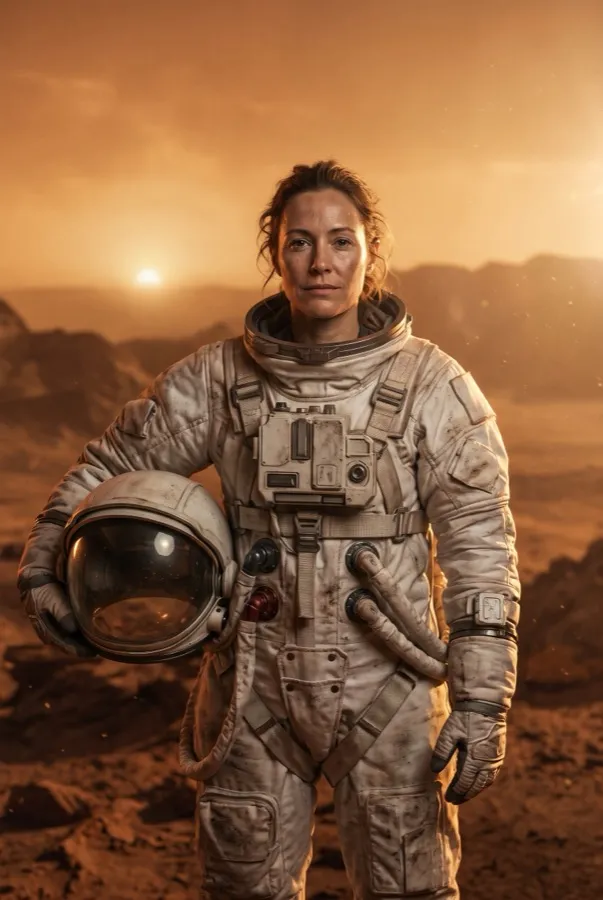
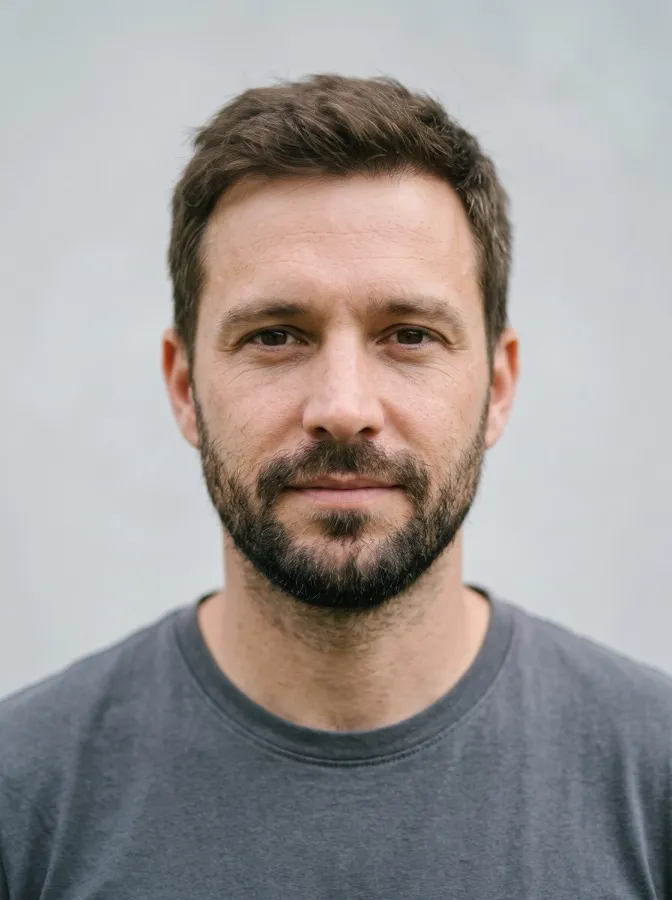

The face is recognisably the bearded man: the beard, brow line, nose and eye shape all carried over, and the warm rim light from the poster falls across his face convincingly. The hair did not carry over. He has the poster's long hair tied back, because this tool swaps faces, not heads. If the hairstyle is part of what makes someone recognisable to you, choose a target whose hair already suits them.
The photo choices that matter most
Match the head angle. A straight-on face photo works best with a straight-on target. A three-quarter or profile target forces the model to invent the parts of the face it cannot see, and invented features drift toward the original.
Match the light. Soft, even light on the face photo gives the model clear features to copy. Hard shadows, coloured stage lighting or a backlit face hide the shapes that make a person recognisable.
Use an unfiltered, unobstructed face. Beauty filters smooth out exactly the details that carry identity. Sunglasses, hands, hats pulled low and heavy hair over the eyes remove them entirely.
Keep the target face large. If the face in the target photo is small, there are too few pixels for the new identity to show. Crop the target closer before you upload it.
Expect expressions to follow the target. If the target is laughing and the face photo is neutral, the result will usually laugh. A big expression change alters the shape of the mouth, cheeks and eyes, which can make the person harder to recognise. Choose a face photo with a similar expression if likeness matters most.
Check the result the way someone who knows them would
- Look at the result next to the face photo at full size, not as a thumbnail.
- Compare eye shape and spacing, the nose bridge and tip, the jawline, and the lips. These carry most of a person's identity.
- Look for leftovers from the target, such as piercings, moles, eyebrow shape or a distinctive smile.
- Check the edges, the hairline and the neck, where blending artefacts show up.
- Ask yourself whether you would recognise the person without being told who it is.
If it fails, change one photo rather than rerunning the same pair. A closer angle match or a clearer face photo improves likeness more than repeated attempts.
Cost, privacy and consent
On LiveFaceSwap.co each result uses 20 credits from the same balance as the live studio, failed results are refunded, and your first photo result is free. Results are about 2K with no watermark. Photos and results are stored privately with your account and processed by a third-party image AI provider only to create the result. They are never used to train models, and you can ask for them to be deleted.
Only use faces you own or have clear permission to use. Our acceptable use policy does not allow impersonation, deception, sexual content or images of minors. If you need the same face on camera, the live studio applies a face photo to your webcam in real time, and the AI Clothes Changer covers the opposite case, where the face stays and the outfit changes.