Published 2026-11-23 · Updated 2026-11-23 · LiveFaceSwap.co
AI clothes changer: what stays, what changes, and how to check the result
Three real runs of a two-photo AI clothes changer: what it kept, what it changed by itself, and a five-point check before you trust an outfit preview.
We gave an AI clothes changer the same two photos twice and got two different pairs of shoes. The person and the suit were right both times: same face, same hair, same pose, a royal-blue blazer and trousers over a cream blouse. In the first run she was wearing the strappy sandals from the outfit photo. In the second she still had the white sneakers from her own photo.
Neither result is wrong, exactly. The outfit photo showed shoes, the person photo showed different shoes, and the instruction said to change the clothing. Whether footwear counts as clothing was left to the model, and the model decided differently each time. That small difference is the clearest way to explain how these tools work, and why you should check a result before you use it to decide on a purchase.
This guide uses three runs of the AI Clothes Changer on LiveFaceSwap.co to show what an image-based outfit swap reliably keeps, what it decides for you, and a quick checklist for reviewing the output.
How a two-photo clothes changer works
You upload two images. The first is the person: the photo whose clothing you want to replace. The second is the outfit: a product shot from a shop, a flat lay on a table, or a photo of someone else wearing the garment. The tool sends both images to an image model with a fixed instruction. Ours tells the model to dress the person from image 1 in the clothing from image 2, and to keep the face, hair, body shape, pose, hands, background, framing and lighting from image 1.
The model does not cut the garment out and paste it on. It redraws the whole picture, using the first photo as the scene and the second as a description of the clothing. That is why the coat in our example below has new folds where the arms bend, and why the lighting on the fabric matches the room. It is also why details can drift: anything the model redraws, it can redraw slightly differently.
Two consequences follow. First, everything you want kept has to be visible and clear in your own photo, because the model rebuilds it from that image. Second, anything ambiguous, such as shoes, layers and accessories, gets resolved by the model, and the resolution can vary between runs.
Run 1: a full suit from an on-model photo
The person photo was a full-length shot of a woman in a green shirt, white top and light jeans. The outfit photo was a different woman wearing a royal-blue suit with a cream blouse and nude sandals. Both were placeholder test images, so we describe the result rather than show it.
What stayed: her face, long dark hair, standing pose, hand position, grey studio background and soft lighting. What changed: the shirt, top and jeans were replaced by the blue blazer, blouse and wide-leg trousers, with the lapels, single button and pocket flaps reproduced. The trousers break at the ankle the way they do in the product photo, on her body.
What varied: the shoes. In one run she wore the sandals from the outfit photo; in a second run with the same inputs she kept her sneakers. Each run took about a minute and a half and returned a 1696 × 2528 image.
Run 2: a coat flat lay over a t-shirt
This example uses fictional people generated with AI, so you can see both inputs and the output.
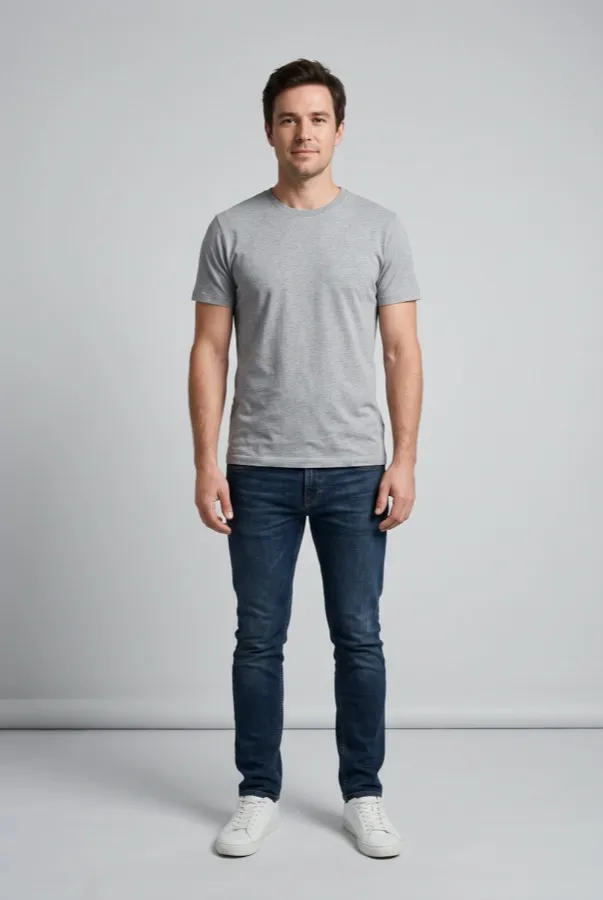
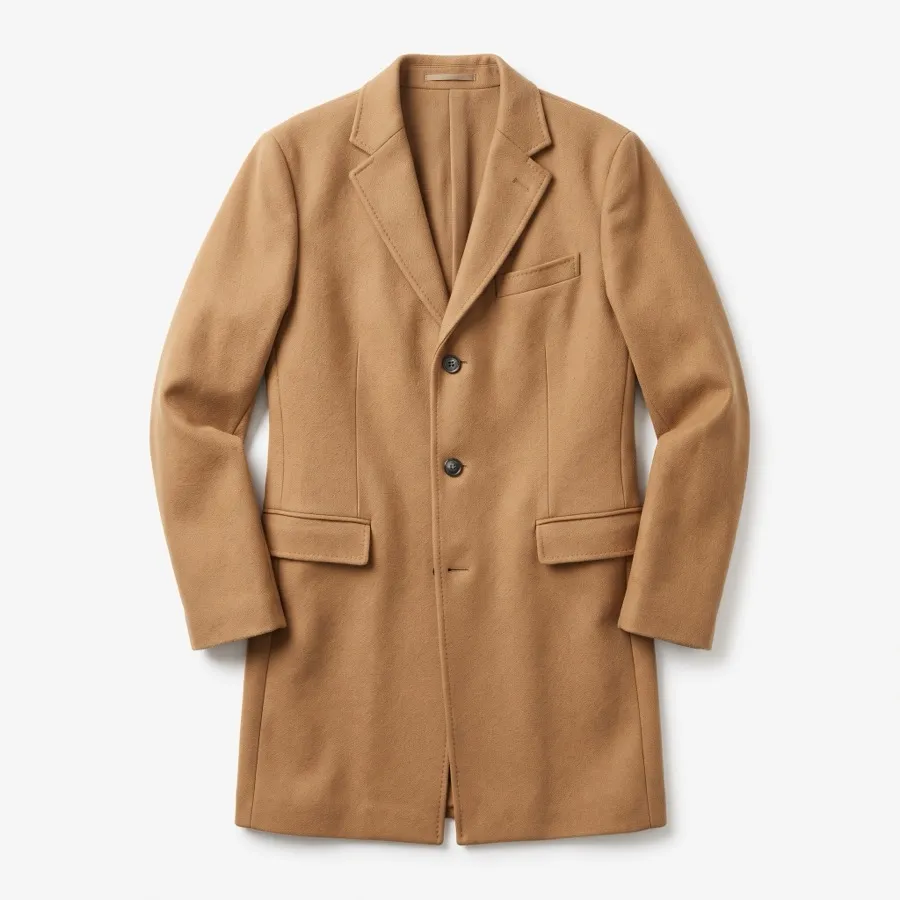
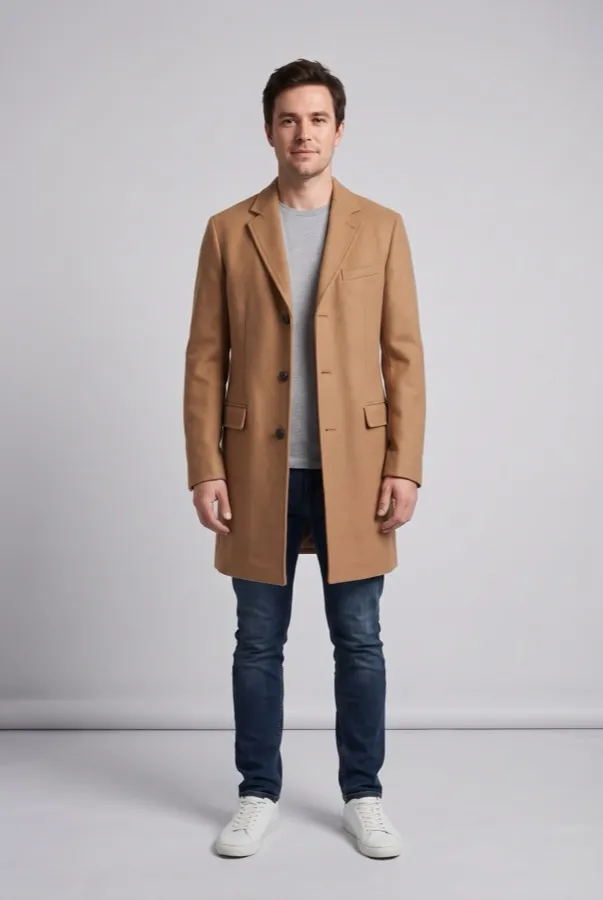
The coat is outerwear, so the model put it on top of the existing t-shirt and kept the jeans and sneakers. It did not invent a new shirt or trousers to go with it. That is the behaviour you want for a "would this coat suit me" preview, and it matches what the outfit photo actually showed: one garment, not a full look.
The flat lay was enough for the model to place the collar, buttons and pockets and to give the coat a believable drape on a standing body. The coat length on his body comes from the model's reading of the product photo. A flat lay has no body for scale, so treat the length as an estimate.
What these runs tell you
Only what the outfit photo shows will be transferred. One coat gives you one coat. A full outfit photo gives you a full outfit, sometimes including shoes and sometimes not. If you want only a top changed, use an outfit image that shows only the top.
Your own photo sets the ceiling. The face, hands and background in the result are redrawn from your photo. A sharp, evenly lit, front-facing full-body shot leaves the model less to guess. Loose clothing in your photo hides your shape, so the new garment is fitted to a guess.
It shows the look, not the fit. The result tells you about colour, style and proportion on your body. It cannot tell you whether a size fits, how a fabric stretches or how a garment hangs when you move. Use the shop's measurements for that.
The same inputs can give different details. If a detail matters, such as the shoes, a logo or the hem length, run it again and compare, or use an outfit image that removes the ambiguity.
A five-point check before you trust a result
- Face and hair. Compare the result with your photo at full size. Eyes, nose, jaw and hairline should be unchanged.
- Garment construction. Check the neckline, sleeve length, buttons, pockets and hem against the outfit photo. These are the details models most often simplify.
- Colour and print. Look at the result and the product image side by side on the same screen. Prints and small logos are the first things to drift, especially from small screenshots.
- What else changed. Look for things that were supposed to stay: shoes, accessories, the background, and your hands.
- Proportion, not size. Use the result to judge how long, wide or bold the piece looks on you. Then check the size chart.
If a result fails the check, change the input rather than rerunning the same pair many times. A larger product image, a photo of yourself in fitted clothes, or an outfit image cropped to the one garment you want fixes more problems than another attempt.
Cost and privacy
On LiveFaceSwap.co each result uses 20 credits from the same balance as the live studio, failed results are refunded, and your first photo result is free. Results are about 2K and have no watermark. Photos and results are stored privately with your account, processed by a third-party image AI provider only to create the result, and never used to train models. You can ask for them to be deleted at any time. Only upload photos of people who have agreed to it.
If you want to see an outfit move, the live studio's Try-On mode puts a reference outfit on your webcam in real time, and the Photo Face Swap tool covers the opposite case, where the clothes stay and the face changes.